Color by what matters
Group by profile, phase, material, class, assembly or any user-defined attribute (UDA) and give every group its own color.

Tekla Structures extension
Color GA-drawing parts by profile, phase, material, class, assembly or UDA — with live preview, drawing legends and reports.
What it does
Drawing Color Studio scans the parts in your general-arrangement drawings and gives each one a color from the grouping you choose, through the Tekla Open API. Colors are written straight into the drawing, so what you preview is what you print.
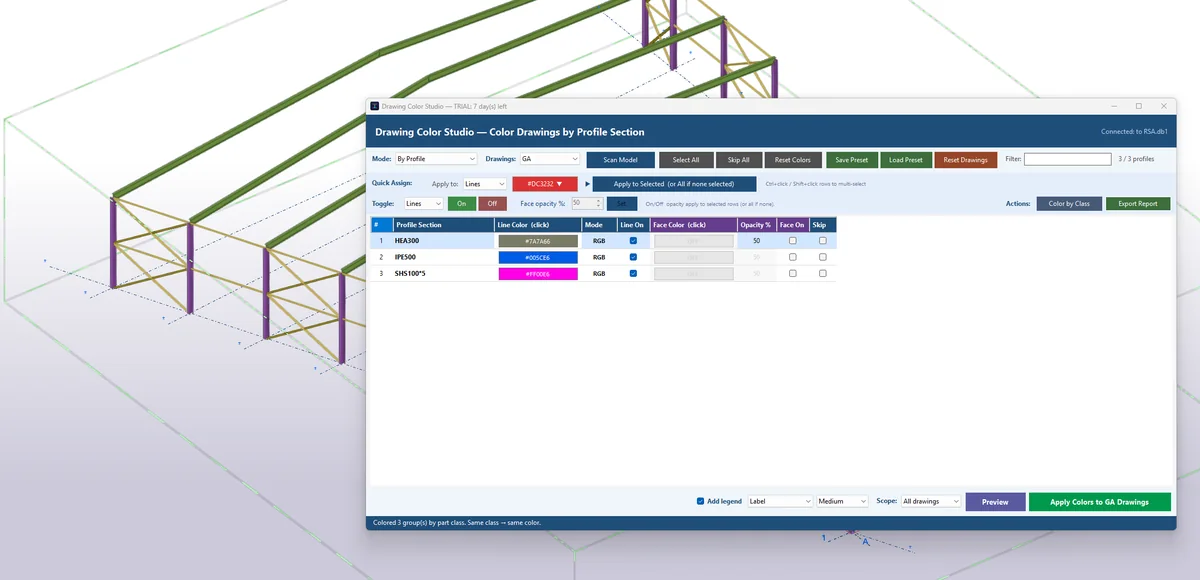
Group by profile, phase, material, class, assembly or any user-defined attribute (UDA) and give every group its own color.
Color parts and bolts, and set the color of grid lines, grid labels and dimension lines and text.
See the result in the preview before you apply it to the drawings, and reset the drawings when you are done.
Add an optional legend to the drawing and produce a summary report of what was colored.
Save your color standard as a .dcs preset and apply the same look consistently across a whole drawing set or project.
A clean interface in the FEM Structures colors, in light or dark theme.
Tick one box and drawings are colored automatically when you open them or Tekla updates them, with your current colors.
Take a baseline when you issue a drawing, then highlight the parts that changed after it: changed, new and unchanged at a glance, in the colors you choose.
Set how strong each group's fill is, from full color down to a light tint, so lines and text stay readable.
Pricing
Every plan has every feature. Prices are in US dollars.
Billed monthly, cancel any time.
Save $34 compared with paying monthly.
Yours forever, with updates for this major version.
The 14-day trial needs no payment and no card. It starts instantly the first time you open the app.
Questions
Download the .tsep package and install it with Tekla's Extension Manager, or get it from Tekla Warehouse. To update, install the new package over the top: your presets and settings are kept.
When you issue a drawing, press Set baseline: the app remembers what every part looks like at that moment. After the model changes, press Highlight changes: changed and new parts get the colors you choose (orange and blue by default) and the rest can be shown in grey. Baselines are stored on your computer, so take them on the PC that issues the drawings.
The app checks your license online when it starts and about once an hour while it is open. Between checks it can keep working offline for a limited time: typically a couple of days on a subscription and about a week on a perpetual license. The first start after an update needs a connection.
Yes. Choose Deactivate in the License window on the old computer, then activate the same key on the new one. A license covers one computer unless you bought more seats.
The app stops until you enter a license key. Your presets are not deleted.
On the first start, choose Already have a license? Enter your license key. Later you can manage it in the License window.
Only what is needed to activate and check the license: your license key, a machine identifier, computer name, Windows user name, operating system and app version. Your Tekla models and drawings are never sent. See the privacy policy.